 Optical Transport Networking Solution
 FTTH Solution
 Home Networking Solution
 POL Solution
 Outdoor OLT Solution
 More
More
 Brand News
 Product News
 Tech Blogs
 CMS
CMS
 Tech Support
 Document Download
 Software Download
 FAQ
FAQ
 Training Center
 About Us
 Careers
 Partners
 Quality Assurance
 Video Center


This website uses cookies to ensure you get the best experience. Some cookies are essential, while others help
us improve your experience by analyzing data or showing personalized content.
For details, please see our
Privacy Policy.

In fiber broadband networks, many users see the terms ONU, ONT, modem, router, and Wi-Fi router used together. This can be confusing, especially when one device seems to handle both fiber access and home networking. The key difference is simple: an ONU connects a fiber access network to the user side, while a router manages local network traffic and internet sharing for multiple devices.
Understanding the difference between an ONU and a router is important for FTTH network deployment, ISP equipment selection, home broadband troubleshooting, and choosing the right customer-premises equipment (CPE).
An ONU, or Optical Network Unit, is a device in a Passive Optical Network that terminates the optical access link and converts optical signals into electrical interfaces for user services. In a typical FTTH or FTTB network, the OLT is located at the service provider side, while the ONU is installed near the subscriber, home, office, apartment, or business location.
The ONU receives optical signals from the fiber network and converts them into electrical signals that user devices or CPE can understand. It may provide Ethernet ports, voice ports, CATV ports, Wi-Fi, or other service interfaces depending on the model.
For example, a service provider may use an optical network unit to deliver broadband access, IPTV, VoIP, and other services over one fiber line. In GPON networks, the ITU-T G.984.3 recommendation describes GPON as operating at 2.488 Gbit/s downstream and 1.244 or 2.488 Gbit/s upstream, making interoperability between OLTs and ONUs an important consideration during network deployment.
A router is a networking device that connects different IP networks and forwards data packets between them. In a home or small business network, the router usually connects the internet access line to local devices such as phones, computers, cameras, smart TVs, and Wi-Fi access points.
A router usually performs several functions:
Assigning local IP addresses through DHCP
Managing Network Address Translation (NAT) so multiple devices can share one internet connection
Forwarding traffic between LAN and WAN
Providing firewall functions
Supporting Wi-Fi access in wireless router models
Managing local network security and access control
Unlike an ONU, a router does not directly terminate a PON optical signal unless it is built into an integrated ONU router device.
The main difference between ONU and router is their network position and function. The ONU belongs to the fiber access layer, while the router belongs to the IP networking and local area network layer.
Item | ONU | Router |
Full name | Optical Network Unit | Router |
Main role | Converts optical signals from the PON network into user-side service interfaces | Routes IP traffic between networks and manages local internet sharing |
Network layer focus | Fiber access / PON termination | IP routing / LAN management |
Typical location | Subscriber side of FTTH, FTTB, or enterprise fiber access network | Home, office, enterprise, or campus LAN |
Connection to fiber | Yes, usually connects to optical fiber | Usually no, unless integrated with an ONU/ONT function |
Common ports | PON, GE/FE Ethernet, POTS, CATV, Wi-Fi depending on model | WAN, LAN, Wi-Fi, sometimes USB or management ports |
Managed by | Often managed by ISP or network operator | Can be managed by ISP, enterprise IT team, or end user |
Example use | Fiber broadband access terminal | Home or business internet sharing device |
In simple terms, the ONU brings the fiber network into the user premises, while the router distributes and manages that internet connection inside the local network.
Yes. Many modern ONU devices are designed with routing functions. These devices are often called ONU routers, ONT routers, FTTH ONU routers, HGU, or home gateway. They combine optical access termination and local network routing in one device.
For example, an FTTH ONU may include a PON port, Ethernet ports, Wi-Fi, and voice ports. In this case, the device does more than convert optical signals. It can also assign IP addresses, provide Wi-Fi coverage, and allow multiple devices to access the internet.
This integrated design is common in residential broadband deployments because it reduces installation complexity. Instead of using one ONU and one separate router, the operator can install a single ONU router to provide fiber access and home networking at the same time.
For example, C-Data Wi-Fi 6 ONU series combines xPON or XGS-PON fiber access with dual-band Wi-Fi 6, multiple service interfaces, Gigabit Ethernet, and remote management in a single devices. Depending on the model, it supports data, voice (POTS), and CATV service ports.
However, in some business, enterprise, or ISP scenarios, separating the ONU and router may still be preferable. A standalone ONU can focus on fiber access, while a dedicated router or gateway handles advanced routing, firewall, VPN, VLAN, bandwidth control, and enterprise network policies.
A standalone ONU plus a separate router is often suitable when the network requires stronger routing performance, advanced management, or flexible equipment deployment.
This architecture is commonly used in:
Small and medium business networks
Enterprise branch offices
Hotels, schools, and apartment buildings
ISP-managed FTTH networks
Networks requiring VLAN, firewall, VPN, or advanced QoS
Scenarios where Wi-Fi coverage needs separate access points or mesh systems
In this structure, the ONU connects to the fiber network, and the router connects behind the ONU. The router then manages all local devices and traffic policies.
For network operators, this structure can also make maintenance easier. If the fiber access device and routing device are separated, each part can be upgraded or replaced according to different technical requirements.
C-Data's SFU series is designed for this deployment model. Available in xPON and XGS-PON variants, these compact ONUs provide reliable fiber termination, Gigabit Ethernet connectivity, and OMCI management, allowing operators to pair with dedicated routers for greater deployment flexibility.
An ONU router is usually suitable for residential users, small offices, and simple broadband access scenarios. It is convenient because one device can provide optical access, Ethernet connection, Wi-Fi, and sometimes voice service.
An ONU router may be a good choice when:
The user needs simple FTTH broadband access
The installation space is limited
The operator wants faster deployment
Basic Wi-Fi and Ethernet access are enough
The network does not require advanced routing functions
Cost and installation efficiency are important
For ISPs and network integrators, selecting the right ONU router depends on PON compatibility, Wi-Fi standard, Ethernet port type, voice support, remote management, and firmware stability.
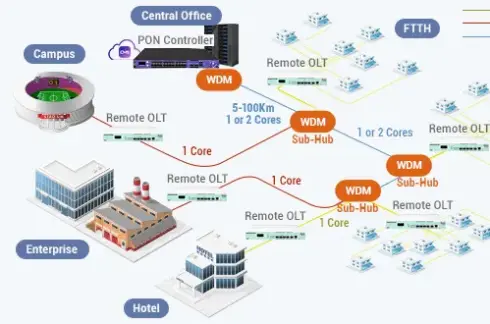
The OLT, or Optical Line Terminal, is the operator-side device in a PON network. It connects to multiple ONUs through passive optical splitters and schedules upstream transmission and broadcasts downstream traffic across the passive optical network.
A GPON OLT is usually installed in the operator's central office, data center, or access node. The ONU is installed at the user side. The router, if separate, is installed behind the ONU to manage the local network.
A simplified network path looks like this:
Internet backbone → OLT → optical splitter → ONU → router → user devices
If the ONU has built-in routing and Wi-Fi functions, the path becomes shorter:
Internet backbone → OLT → optical splitter → ONU router → user devices
This is why many users think ONU and router are the same device. In reality, they are different functions that may be built into one physical product.
Choosing the right device depends on the deployment scenario and network requirements.
For residential FTTH users, an ONU router is often enough because it combines optical access and Wi-Fi sharing. For enterprise users, a standalone ONU plus a professional router may provide better performance, security, and management flexibility. For ISPs, the decision should consider OLT compatibility, remote management, firmware upgrade capability, service type, and long-term maintenance cost.
A practical selection logic is:
Choose a standalone ONU when you only need optical signal termination and will use a separate router.
Choose an ONU router when you need one device for fiber access, routing, and Wi-Fi.
Choose a separate router when you need stronger firewall, VPN, VLAN, bandwidth control, or multi-WAN features.
Choose the ONU based on the OLT platform, PON standard, port type, and service requirements.
The difference between ONU and router comes down to their roles in the network. An ONU connects the fiber access network to the user side and converts optical signals into usable service interfaces. A router manages IP traffic, shares the internet connection, and controls the local network.
In modern FTTH deployments, these two functions are often combined into one ONU router. This is convenient for homes and small offices. However, for business users, enterprise networks, and ISP-managed deployments, separating the ONU and router can provide better flexibility, performance, and control.
For network operators and integrators, the best choice is not simply ONU or router. The more important question is whether the project needs a basic fiber access terminal, an all-in-one ONU router, or a more flexible ONU plus dedicated router architecture.
No. An ONU and a router are not the same. An ONU terminates the fiber access network and converts optical signals into user-side interfaces. A router forwards IP traffic and manages the local network. Some devices combine both functions, which is why they are often confused.
Yes, in some cases. If the ONU has only one Ethernet port and the ISP assigns internet access directly, one computer may connect to it. However, if multiple devices need internet access or Wi-Fi, a router or ONU router is usually required.
An ONU router is a device that combines ONU and router functions. It connects to the fiber PON network and also provides routing, NAT, DHCP, Ethernet ports, and Wi-Fi access for local users.
In many FTTH scenarios, ONT and ONU are used almost interchangeably. Technically, ONT is often considered a specific type of ONU used at the customer premises. In practical broadband deployment, users may see both terms used for similar fiber access devices.
It depends on the OLT and PON network standard used by the service provider. A GPON ONU should work with a compatible GPON OLT, while an EPON ONU should work with an EPON OLT. Some xPON ONU models can support dual-mode compatibility, but actual deployment should follow the operator's network requirements.
Many ONU devices include Wi-Fi because residential and small office users prefer one device for fiber access and wireless internet. This reduces installation cost, saves space, and simplifies maintenance for broadband operators.